All work

Review & Manage Attachments

Launched the Review & Manage Attachments capability in 2025 to help customers confidently view, find, and delete the attachments they’ve shared with Alexa+.

Role
Lead UX Designer — Privacy & Trust
Timeline
Oct 2024 – Mar 2025
Team
Product · Eng · UX Research · Legal
Surfaces
Mobile app · Echo devices
What I owned
  • Owned the complete design of the feature, end to end.
  • Redefined the mental model for shared attachments — from conversation-first to file-first — and rebuilt the experience around it.
  • Conducted user research with our research partners — moderated usability studies, RITE sessions, and more.
  • Drove the delete-vs-archive decision with Alexa+ senior leadership, and aligned them on shipping deletion first.
  • Defined the privacy framework and plain-language system across the review, retention, and deletion flows.
When sharing outpaced control

Alexa was becoming more than a voice assistant.

In late 2024, Alexa began moving out of the command-and-response era and into the age of large language models — a ground-up reinvention that became Alexa+.

Where the old Alexa took one-off commands, Alexa+ became something customers converse with and hand documents to — it could read an attachment, summarize a file, and refer back to what they'd shared. None of that existed before. And so Alexa+ started holding customers' documents, with the context of why they were shared — a kind of vault a phone's file system could never be, because a folder has no memory of the conversation around a file.

That unlocked a net-new design problem our team owned. Sharing a file with Alexa+ is intentional — a customer hands over an invoice, a form, or an itinerary because there's a conversation around it and a reason to come back to it later, not to dump it somewhere. So those documents needed a home of their own: a central place to find them without digging through chats, to see what's being kept and for how long, and to remove what's no longer wanted. Today Alexa+ serves 100M+ customers, and it's that whole cluster of small things — easy to find, clear about what's retained, simple to delete — that earns their trust. That trust is the feature.

The reframe

But shared files disappeared into the conversation.

Once a customer shared an attachment, finding it again meant going back through long conversation histories.

That worked poorly for the files people most wanted to revisit later — an invoice, an itinerary, a home document, a recipe, a school form.

Across moderated usability studies and RITE sessions — 50 participants in all — the same pattern repeated. Customers struggled to locate files, felt uneasy without a way to delete, and were unsure what Alexa retained after a conversation ended. Three recurring anxieties. Each one became a commitment.

Invisible
Make it visible
Attachments were buried inside long conversation histories, making them hard to find when customers needed them again.
70%+
struggled to find a specific file quickly — often taking more than 20 seconds, or failing the task entirely.
Permanent
Make it controllable
Customers could share files with Alexa, but had no clear way to permanently remove them later.
75%+
felt that sharing files without a way to remove them made Alexa feel incomplete.
Unclear
Make it reassuring
Customers weren't sure what Alexa stored, how long files stayed, or what happened after a conversation ended.
60%+
were unsure what Alexa kept after a conversation ended, or how long files remained stored.
Designing for the file, not the chat

Rewrite the model.

The first version rolled out as a measured weblab — dialed up to 50% — and the model got sharper across two deliberate revamps.

The first release just made attachments available — customers could see what they'd shared, but not delete it, and the list was rendered in a webview, so it leaned on old, off-platform components. The next revamp added deletion, but every file was still grounded in the conversation it arrived in: the metadata told them who shared it, when, and which chat it belonged to. That model broke on a simple fact — the same file gets referenced across many conversations. A document shared once and pulled up three more times doesn't belong to any single chat, and listing every conversation it had touched was neither scalable nor useful.

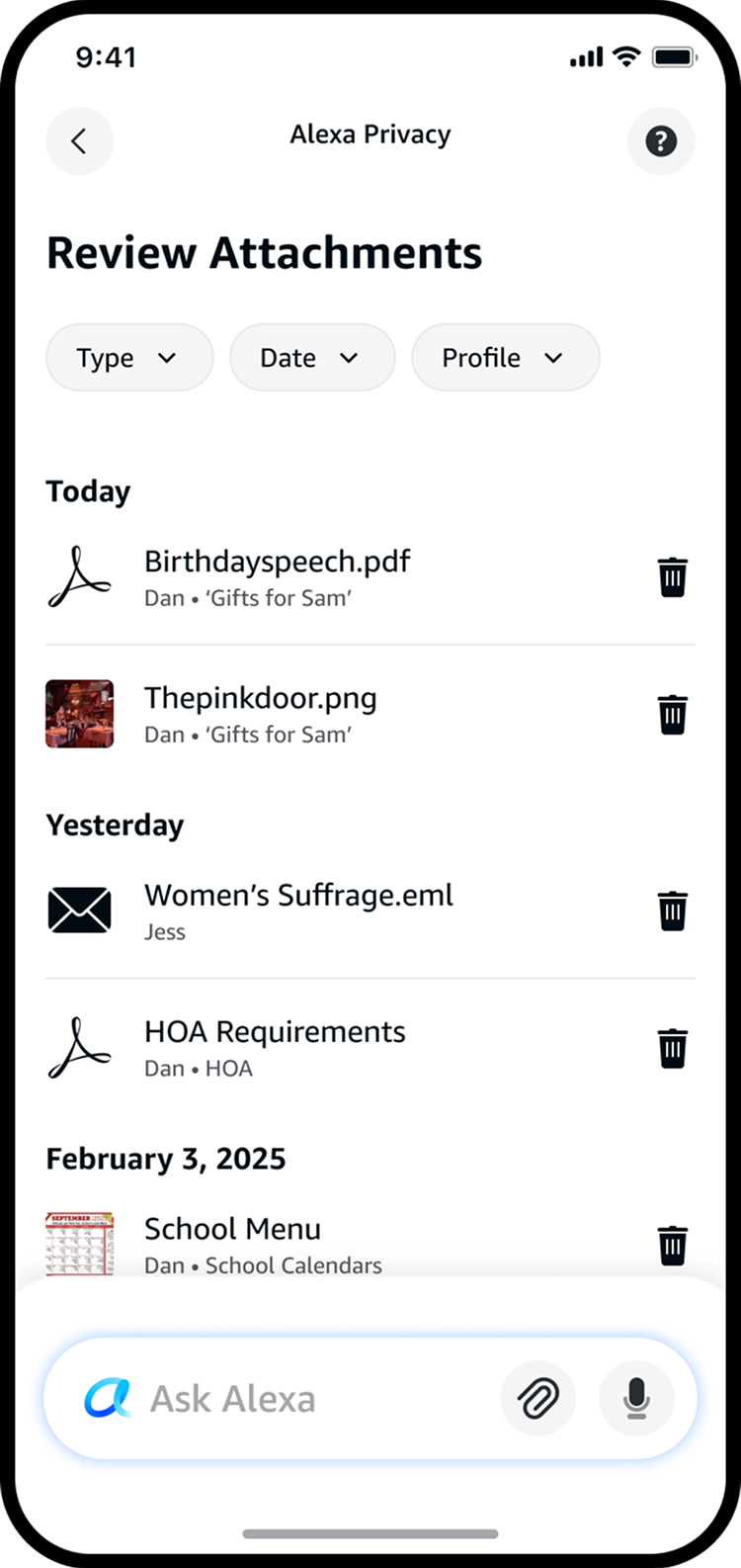
So I reworked the model from conversation-first to file-first. Grounded in the UX research and RITE sessions the team ran: people recognize a file by its name and who shared it, not by the chat it came from. So I dropped the conversation metadata entirely and surfaced file size in its place. And P0's per-row delete didn't scale — more file actions were coming, and an always-exposed button was too easy to tap by accident — so I moved deletion into a deliberate swipe.
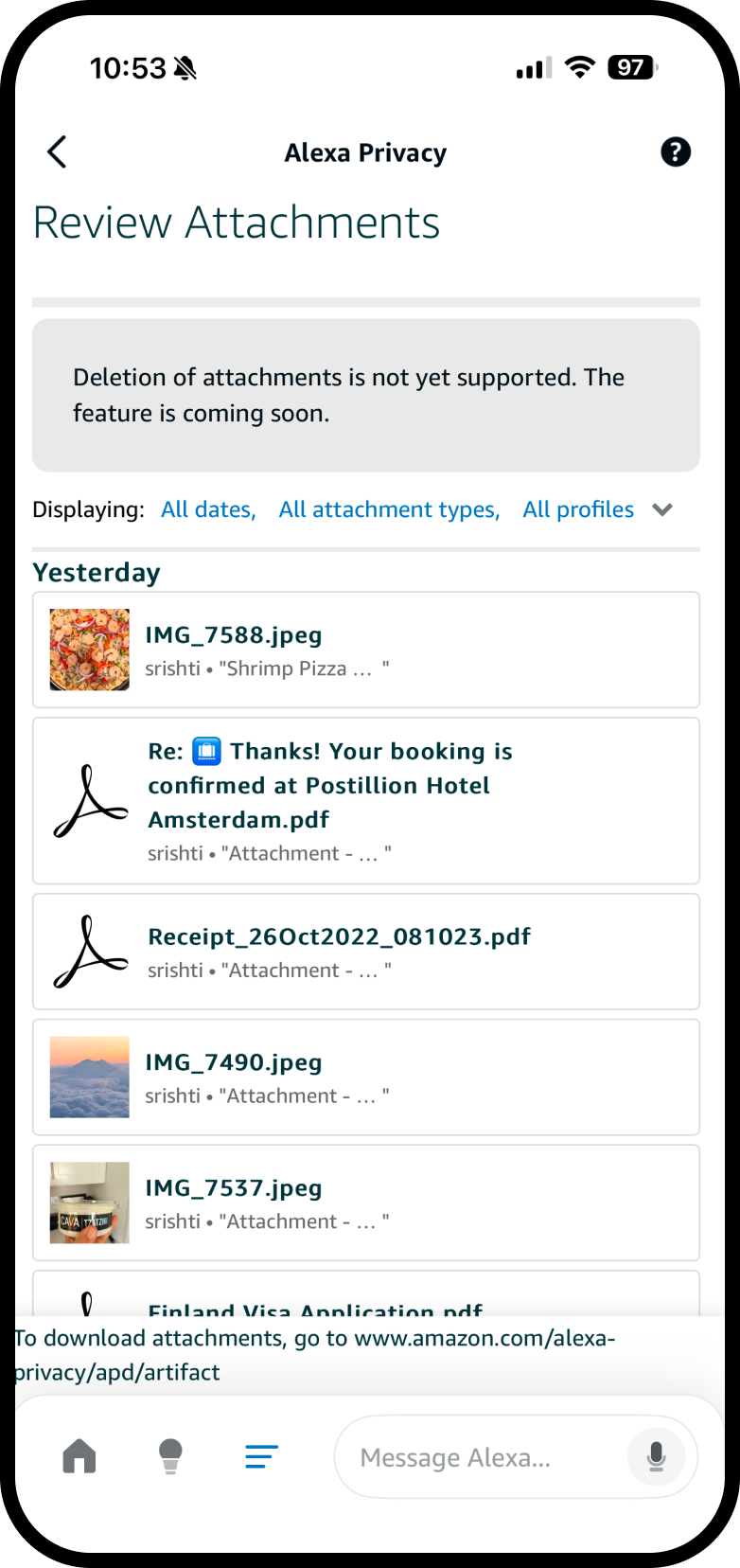
Before · no deletion
Earliest Review Attachments — deletion not yet supported, rendered in a webview

Before deletion existed. The list lived in a webview, so the components looked off-platform — and there was no way to act on a file.

P0 · conversation-first + delete
P0 release — conversation-first list with the first per-file delete capability

P0: the first release to add deletion — still conversation-first, with files grouped under the chat they arrived in.

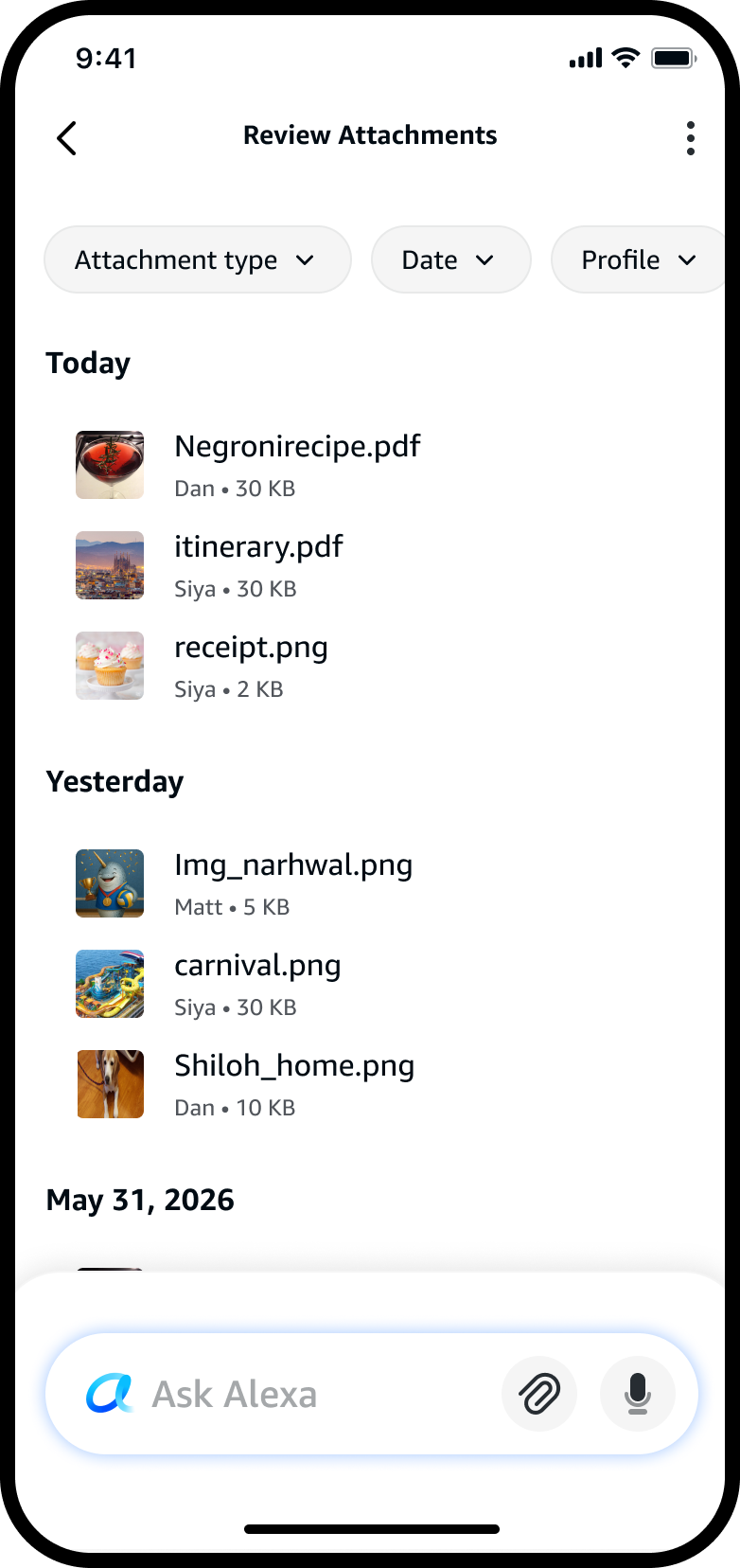
Shipped · file-first redesign
Shipped Review Attachments — file-first redesign with thumbnails, file size metadata, search, filters and file-level actions

Shipped: a full file-first redesign — thumbnails, file size as the key metadata, filters and clean file-level actions.

In practice · Siya · runs a small baking business

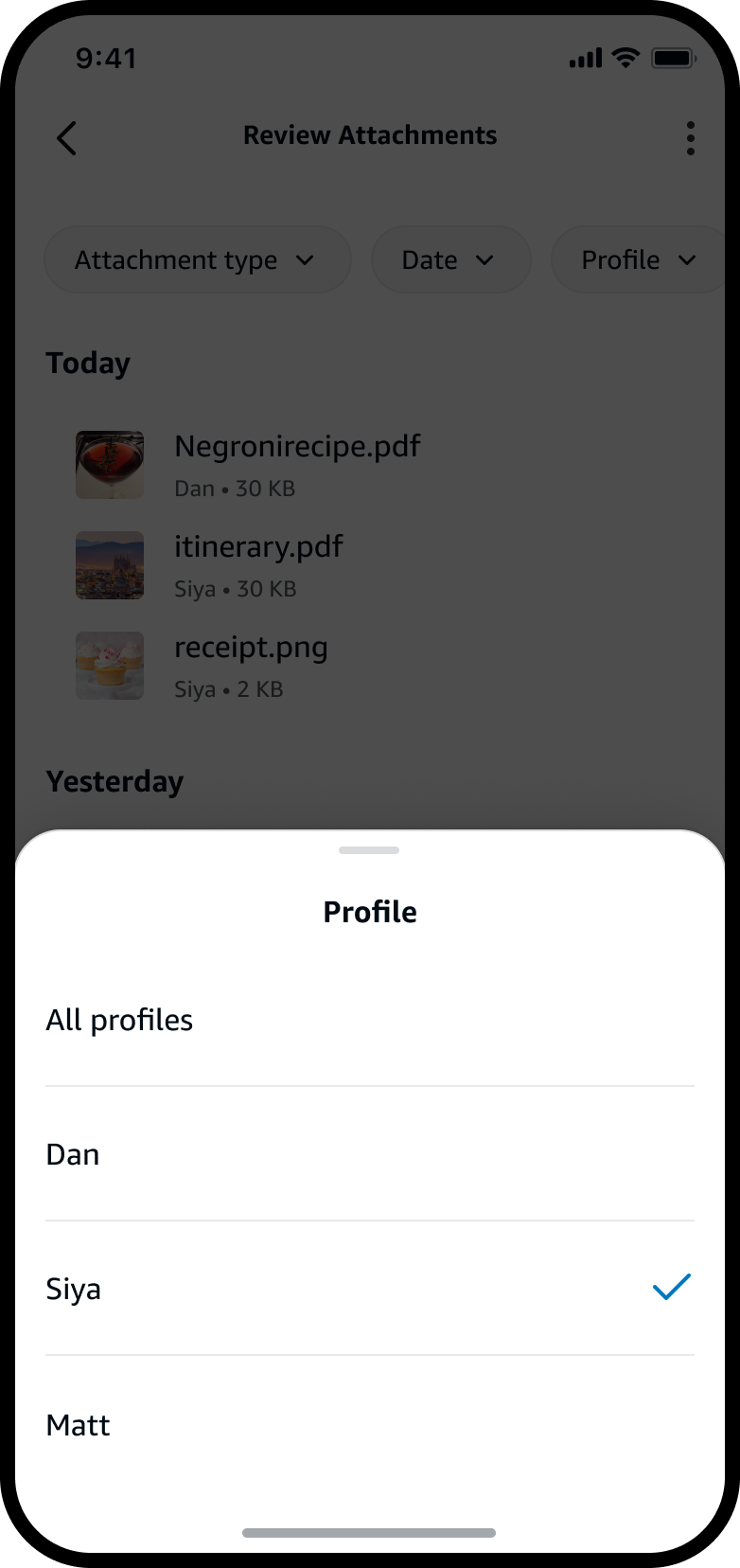
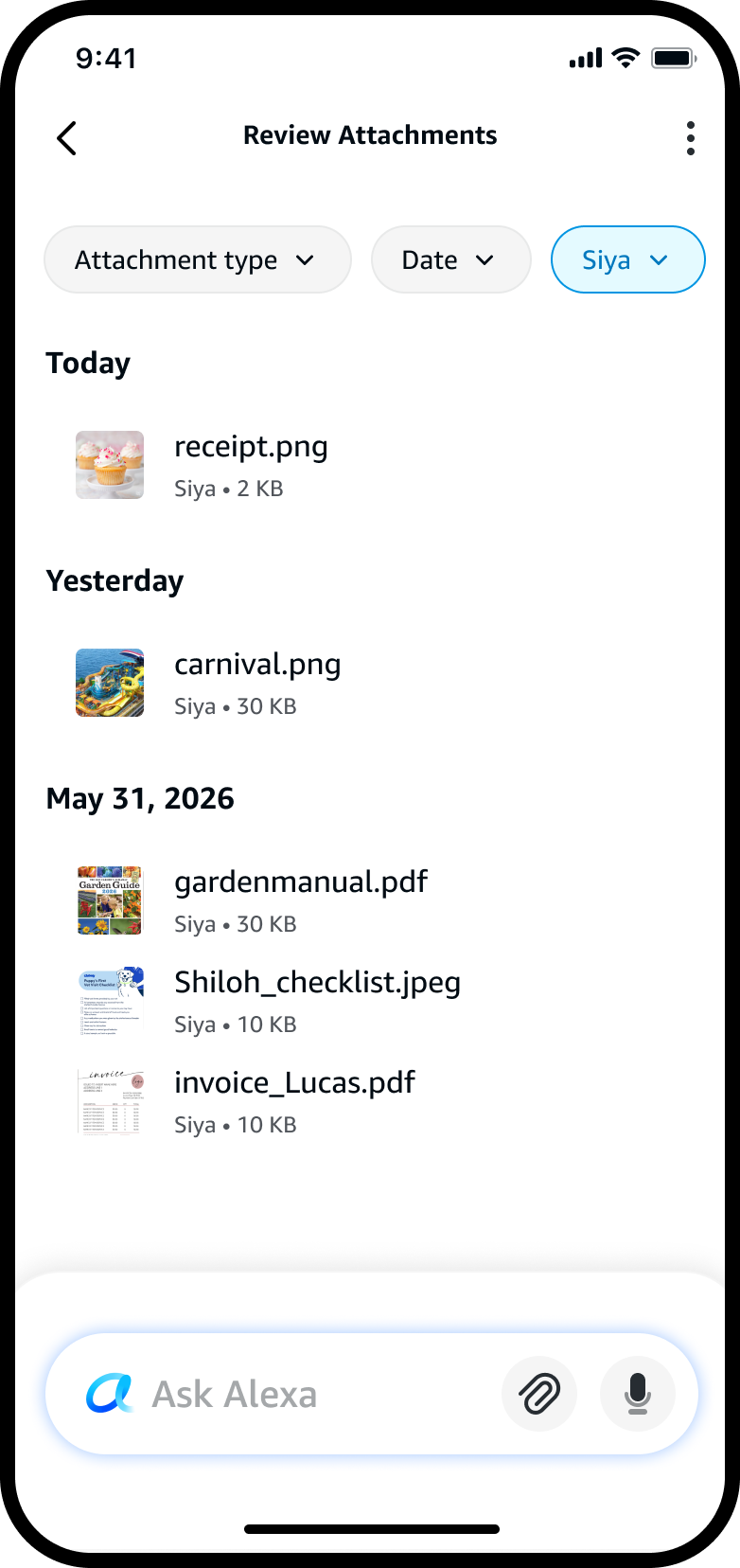
A customer asks about a cake order from February. Siya opens Review Attachments, filters to her own profile, and — within seconds — she has the invoice open, the detail checked, the payment confirmed.
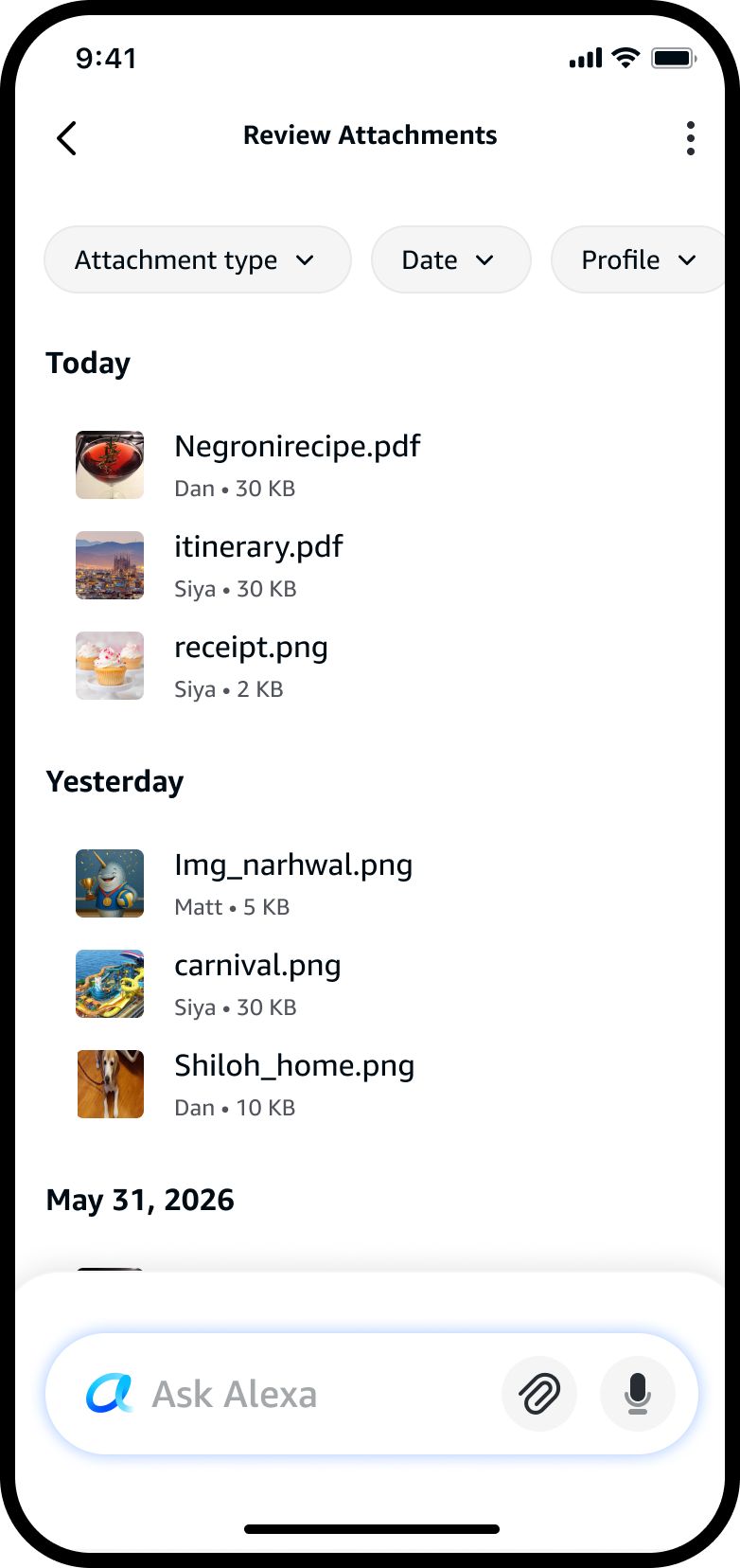
Now · all profiles
Shipped Review Attachments — file-first list across every profile, grouped by date, with thumbnails and file size as metadata

The shipped file-first list: every attachment across the household, grouped by date, with file size as the key metadata.

Filter by profile · who shared it
Profile filter bottom sheet — All profiles, Dan, Siya (checked), Matt; Siya selected

Siya narrows by the dimension she remembers — who shared it — and picks her own profile.

Narrowed to Siya · just her files
Review Attachments filtered to Siya, showing only her files including invoice_Lucas.pdf

The list collapses to just her files — the cake invoice now a tap away.

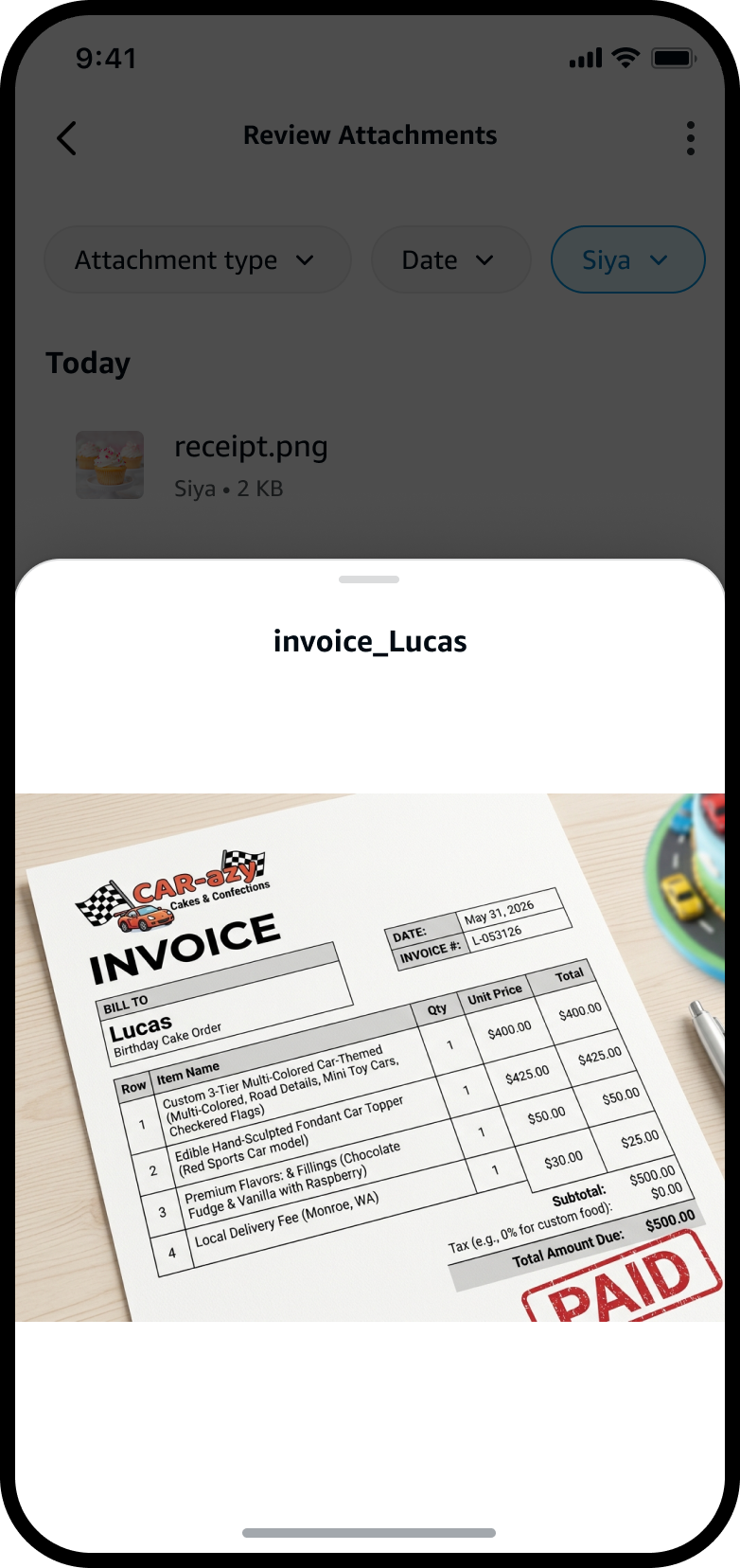
The invoice, found · quick view
invoice_Lucas opened in a quick view, showing a paid cake-order invoice

Quick view, on tap: the cake order open, the detail checked, the payment confirmed — without scrolling a single chat.

Customers remember the file, not the chat.So I built retrieval around the file itself — filters and quick views.

Making deletion feel safe

But visibility alone wasn't enough.

Seeing attachments closed the transparency gap. It didn't close the trust gap.

Customers didn't just want to see their files — they wanted to remove the ones that felt sensitive, outdated, or no longer useful. Deletion became the core trust action.

The interaction had to be quick enough for everyday cleanup, but deliberate enough to prevent accidental removal. So I designed the deletion flow around confidence: act on it at the file level, confirm, and get clear feedback once it's gone. For customers, this changed the experience from passive visibility to meaningful control — they could decide what stayed and what went.

In practice · Siya · gardening in her downtime

Siya keeps a stack of gardening manuals in Alexa+ to chat through her plants. She notices she's been leaning on an old guide, so she swipes to delete it — confirms once, and a message tells her it's gone for good. No second-guessing, no clutter.
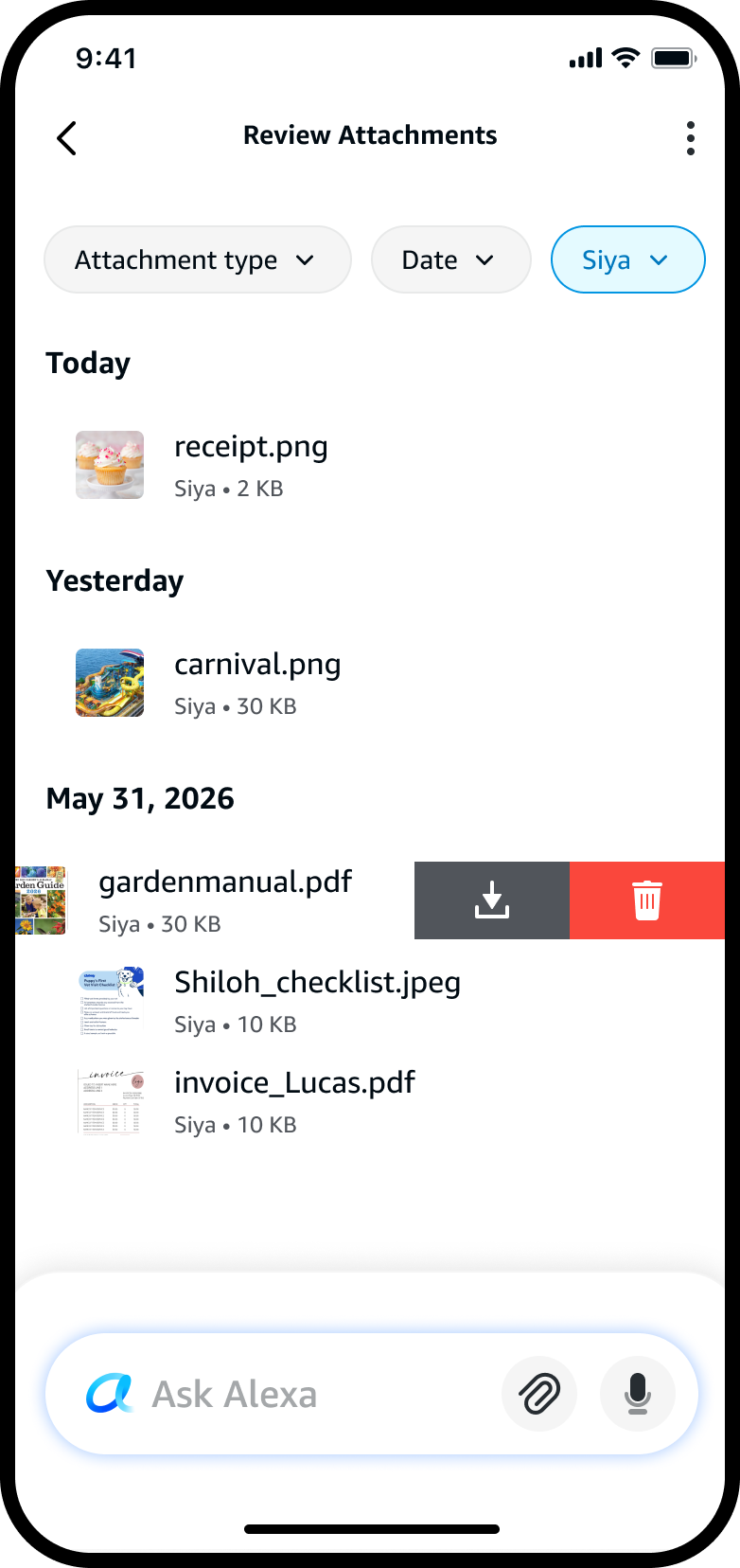
Swipe to delete · file-level
Review Attachments — swiping the old gardenmanual.pdf row reveals download and delete actions

Siya swipes the old gardenmanual.pdf — the delete action sits right where she's looking.

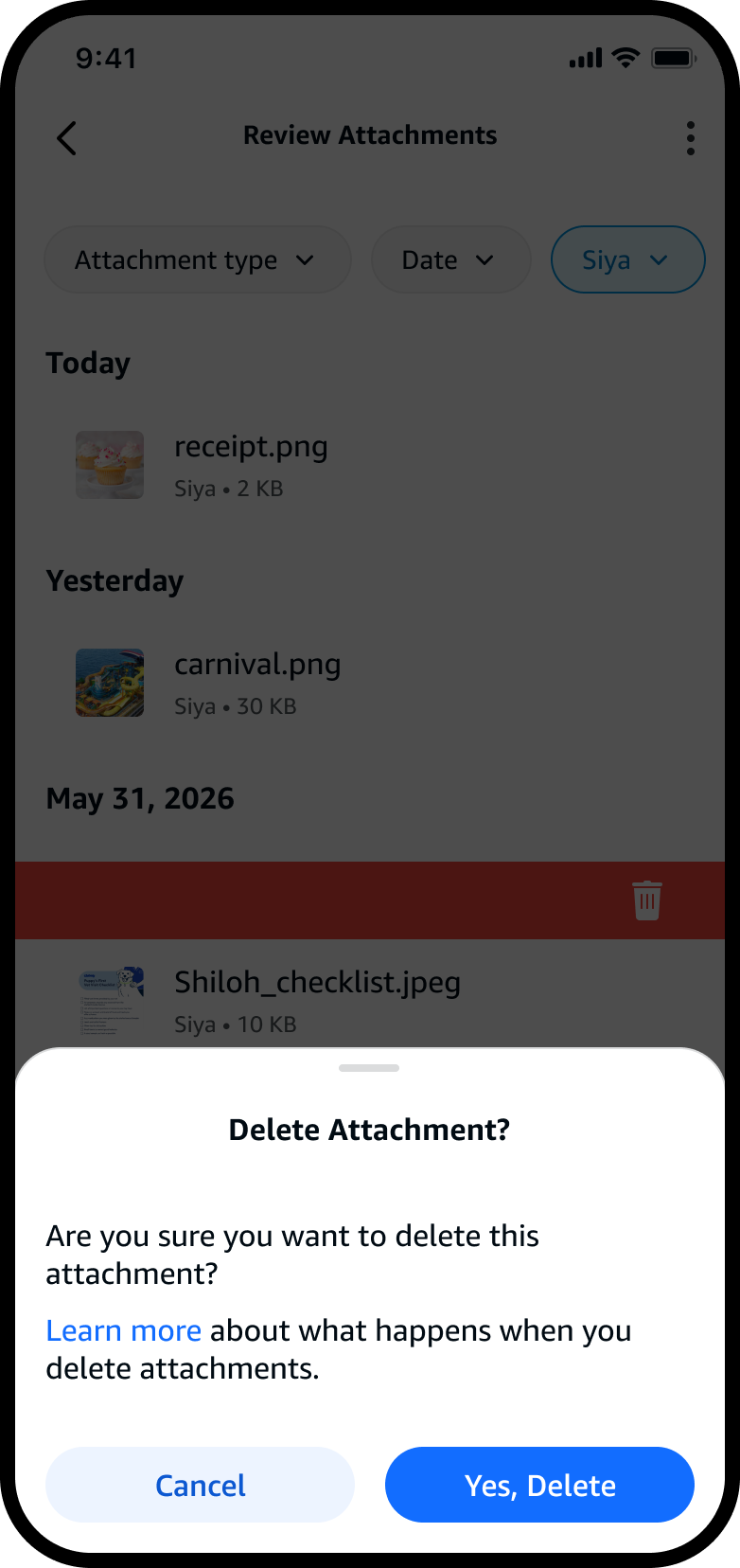
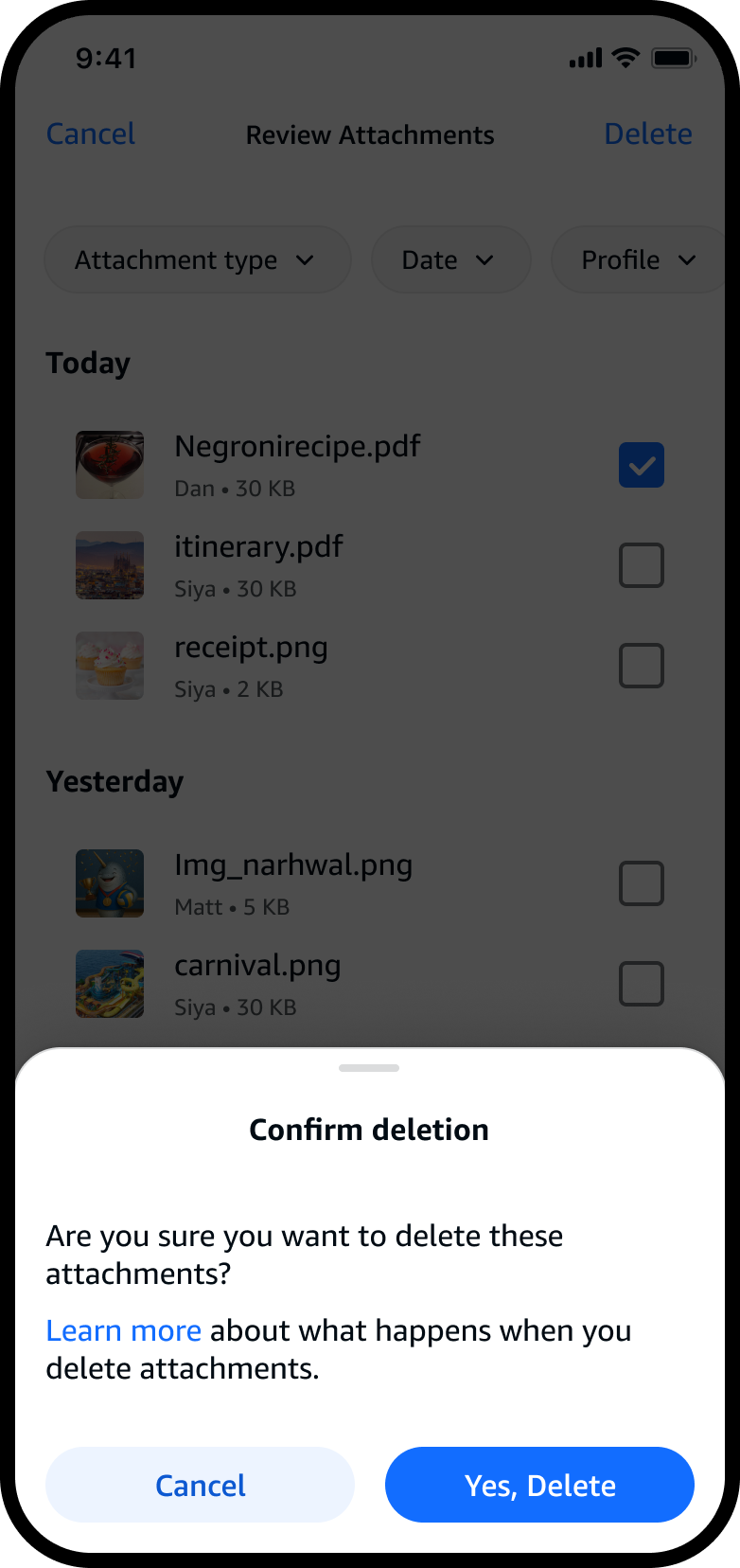
Confirm once · deliberate
Delete Attachment confirmation sheet asking Siya to confirm, with a Learn more link and Cancel / Yes, Delete buttons

A single confirmation — plain-language, with a “learn more” for what deletion means. Hard to trigger by accident.
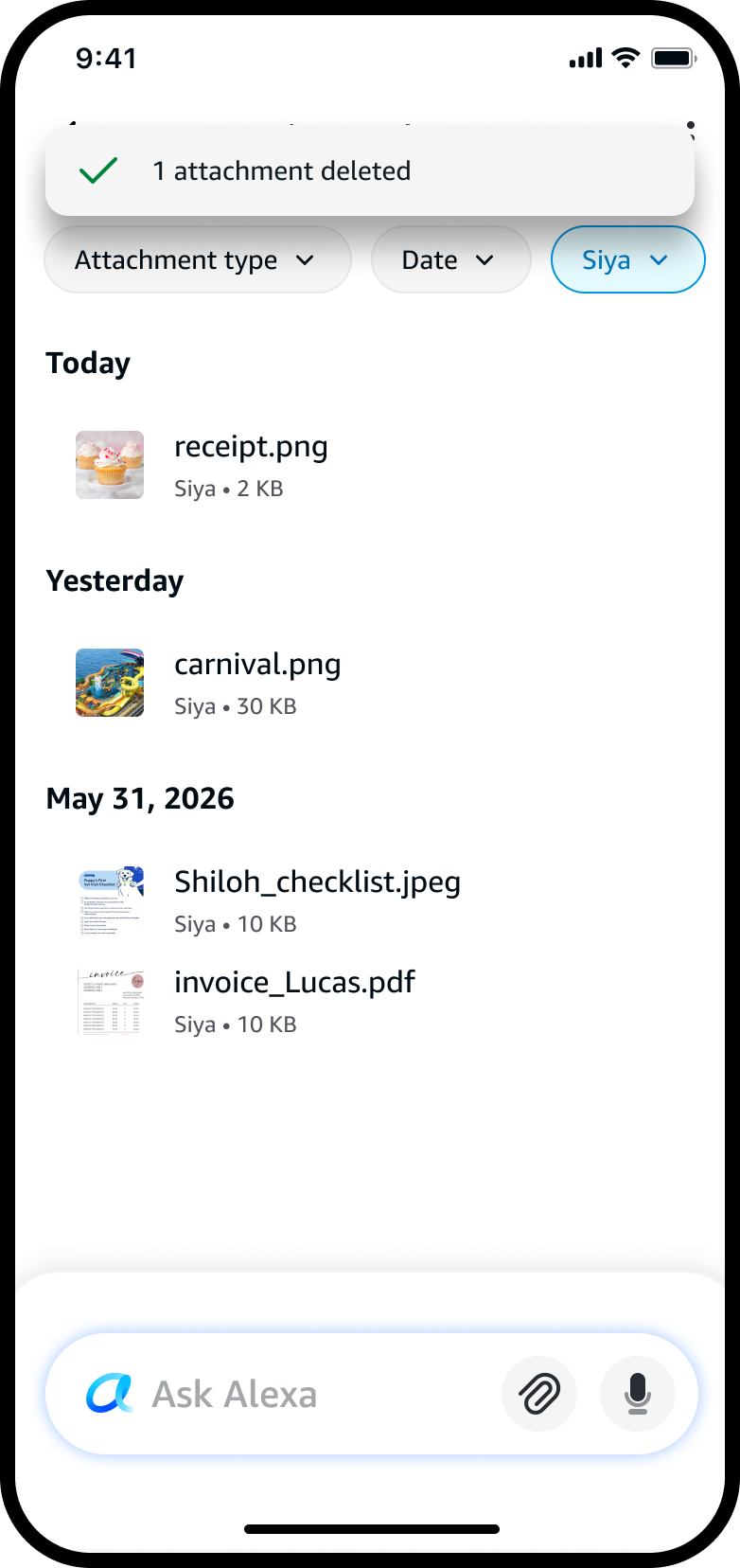
Gone for good · clear feedback
Review Attachments after deletion — a confirmation message reads 1 attachment deleted and the manual is gone from the list

“1 attachment deleted” — instant, reassuring feedback, and the manual is gone from the list.

Control had to feel fast, deliberate, and safe.Quick to reach. Hard to trigger by accident. And clear, reassuring feedback the moment a file is gone.

Words people could trust

Privacy messaging needed restraint.

Privacy experiences tend to fail in one of two ways — too vague to build trust, or too heavy to feel usable.

It needed to explain enough without turning into a wall of legal or technical language. I kept the interface to plain-language clarity: what the file was, who shared it, when it was added, where it could be managed, and what deletion actually meant.

In practice · Matt · just finished his taxes

Matt shared W-2s and receipts weeks ago and couldn't remember what Alexa still had. He opens privacy settings, reads in plain language exactly what's retained and for how long — and when he asks Alexa about an old upload, it tells him it was auto-deleted on his terms. No legal fine print, no second-guessing.
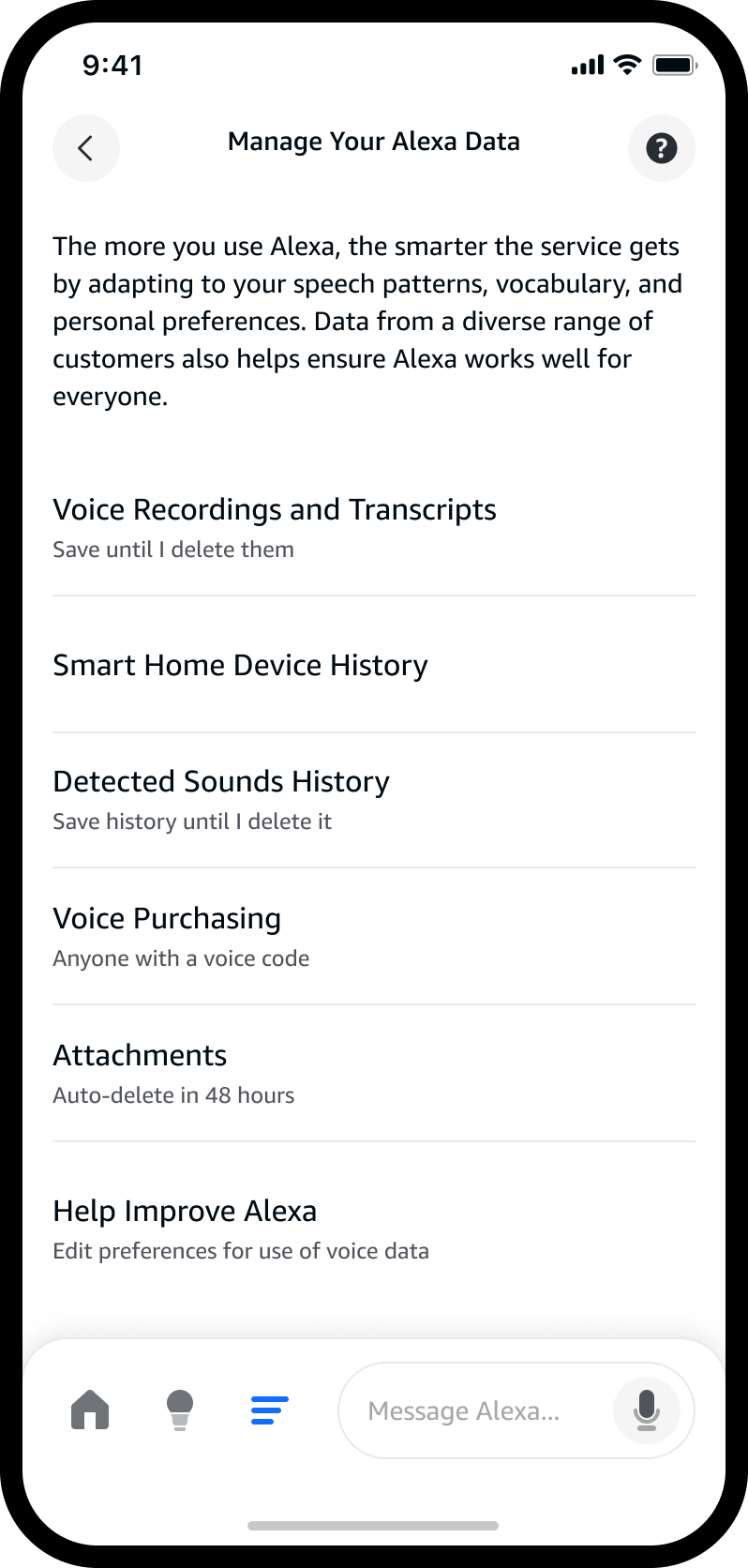
Settings · what's retained
Manage Your Alexa Data — plain-language privacy settings showing each data type and its retention, including Attachments set to auto-delete in 48 hours

Plain-language controls: every data type spells out what's kept and for how long — attachments auto-delete in 48 hours.

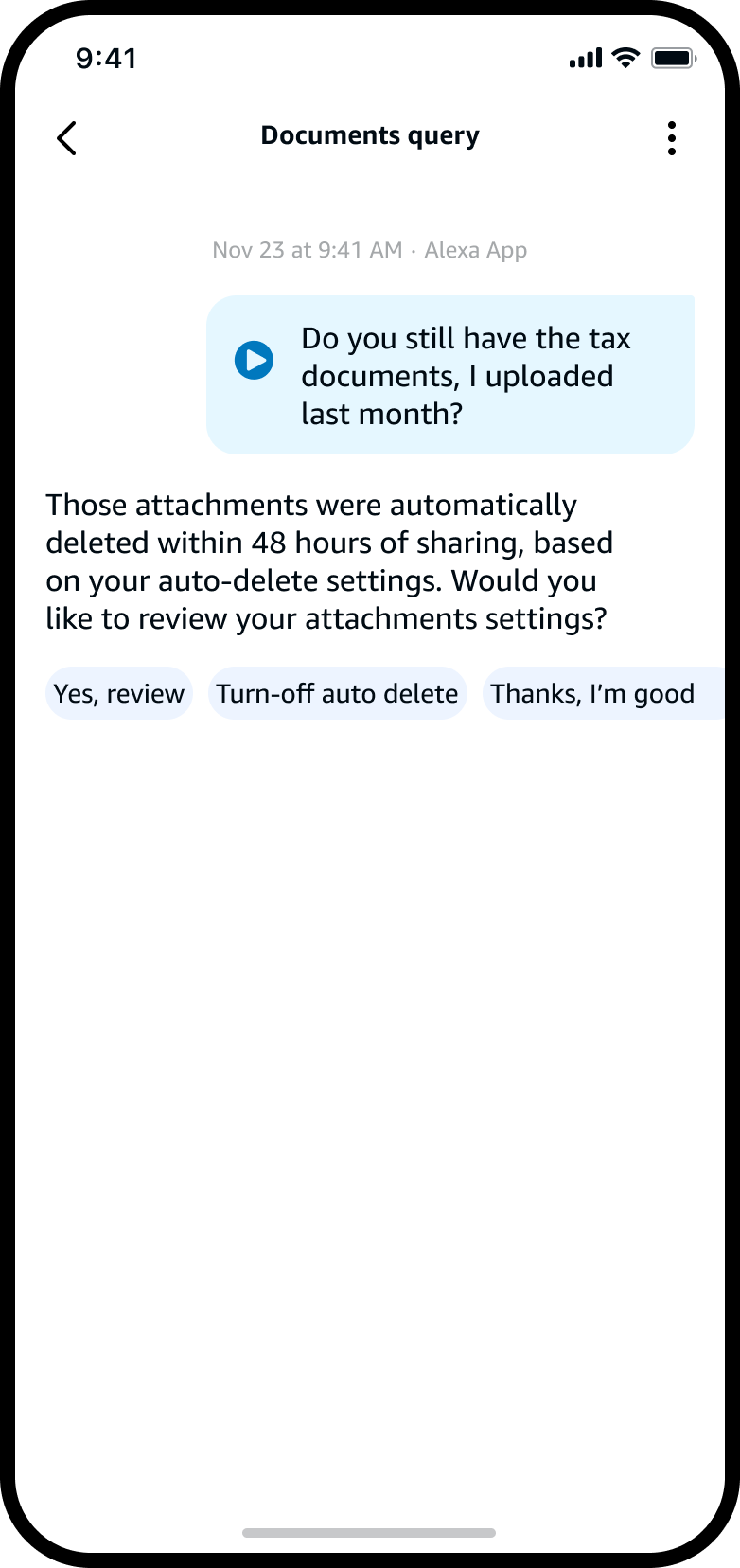
In conversation · honest answers
Documents query transcript — Alexa tells the customer their attachments were auto-deleted within 48 hours, and offers to review attachment settings

The same honesty in the conversation: Alexa says what happened to a file and offers to review the settings behind it.

The goal was to make privacy feel understandable, not alarming.

The principles I designed against
Principle 01
Clear Access
Customers should always know where to review and manage shared content.
Principle 02
Intentional Simplicity
Sensitive actions should be clear and confirmation-based — hard to trigger by mistake.
Principle 03
Clarity Through Details
The interface should provide just enough context to support fast, confident decisions — and no more.
The decision I drove

Delete, or just archive?

The most important call on this work stream was deciding which privacy feature to build first.

As we scoped the first management action, the question went all the way up — senior leadership was split between letting customers archive files or delete them.

Archiving only hides a file from view — the data, and its references inside conversations, stay. That was the red flag: an archived attachment isn't truly gone, so Alexa could still reference it and draw inferences from it in conversation. Legal pushed hard on exactly this — if a customer “removes” something but the model can still pull it back up, what does removal even mean? Deletion removes it everywhere, including every conversation that touched it. So this was never an organizational convenience or a way to tidy the view — it was the thing that actually earns trust.

The design team pushed back on starting with archive. The argument I carried into those reviews was simple: customers only share sensitive documents when they believe they can truly take them back — and if an archived file can still be referenced, that belief breaks. A privacy-first experience can't rest on a feature that merely tidies the view. I brought the research, the trust framing, and the customer scenarios to senior leadership and aligned them around deletion.

Deletion shipped first. Design didn't just inform that call — it drove it.

Trade-off
A confirmation step, by design
Early Alexa models had no deletion confirmation at all. Because deletion is permanent and the MVP shipped without undo, I defended adding a deliberate confirmation step — a moment of friction worth never compromising safety in a privacy-first flow.
What's nextAn undo action and “Recently Deleted” as lighter safety nets on top of it.
Trade-off
A dedicated page over inline
A single, dedicated management surface settled the “which chat owns this file?” ambiguity for good — and shipped faster than inline controls, which would have demanded real-time syncing across every thread and device.
The tradeManaging a file takes a quick step out of the chat — in exchange for one reliable place that scales.
The impact it had

Trust customers could feel.

Getting privacy right is what makes the whole document-sharing experience possible.

The experience launched in Early Access and is now full-fledged — part of an Alexa+ that serves 100M+ customers. People share more, and more sensitive, documents when the controls are honest and within reach, and the research bore that out.

6.25/7
CSAT score — exceeding our beta goals for the review and deletion experience.
+25%
improvement in customer trust score after the privacy controls shipped.
100M+
customers Alexa+ now serves, with privacy at the center of file sharing.
Building on the foundation

Where the experience goes next.

As Alexa+ takes on richer multimodal tasks, file management has to scale beyond review and deletion — toward more AI-native controls. Several of these directions came out of this work, and a few have already been green-lit into the roadmap.
Part of operational planning
Bulk actions
Select and remove multiple attachments at once — the same deliberate model, scaled to many files with a single confirmation.
Green-lit
Recently deleted recovery
A soft-delete window that lets customers recover removed content — speed balanced with safety.
Exploring
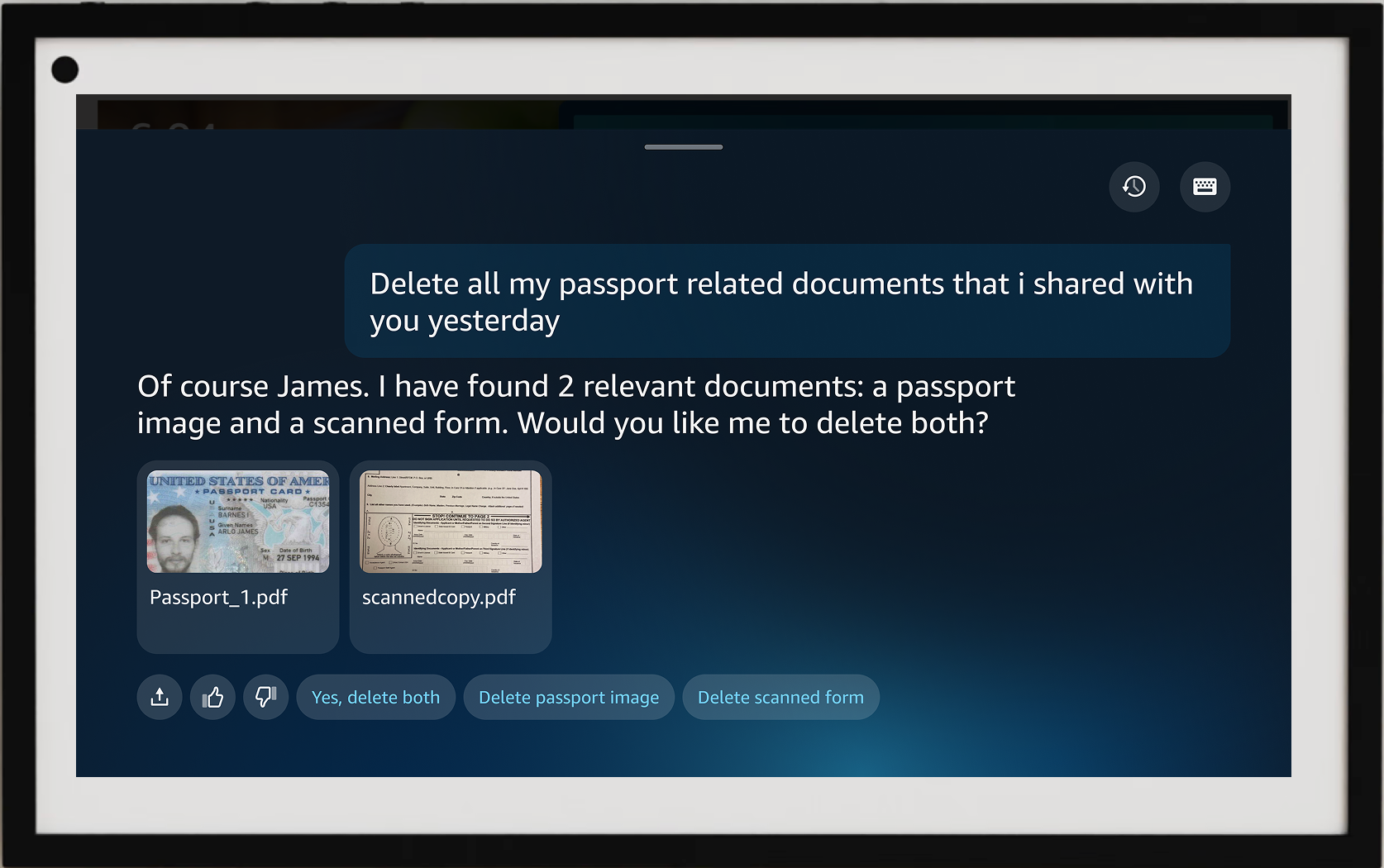
Voice-driven deletion
“Delete all my passport documents I shared yesterday” — Alexa surfaces the related files, confirms on-screen, and removes nothing until the customer says so. The same control, driven by voice on Echo.
Parked
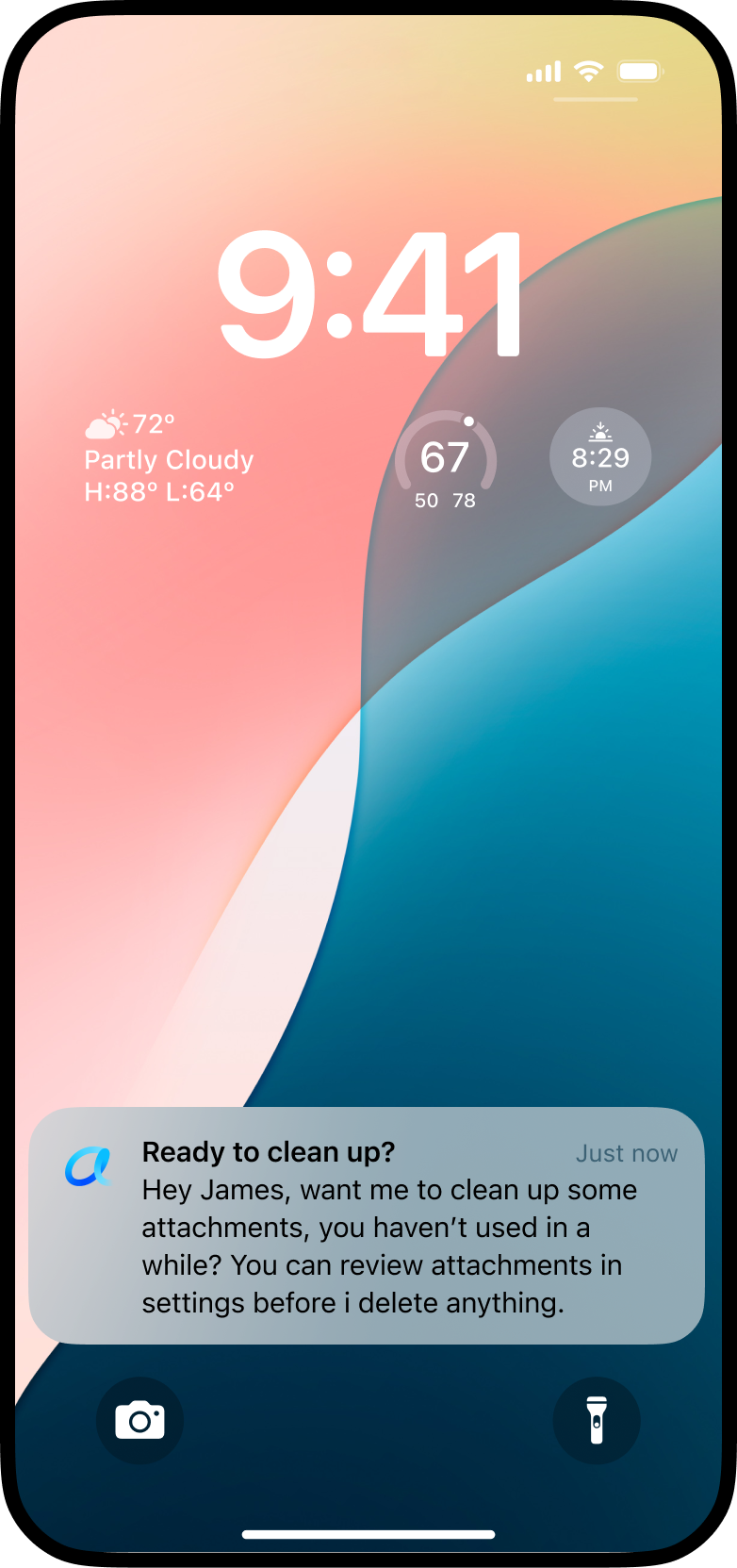
Proactive cleanup
Alexa detects stale attachments and gently prompts a review. Promising, but not the priority yet.
Proactive cleanup
Lock-screen notification from Alexa: ‘Ready to clean up? Want me to clean up some attachments you haven’t used in a while? You can review attachments in settings before I delete anything.’

Alexa notices stale attachments and offers to tidy up — always pointing to review before anything is removed.

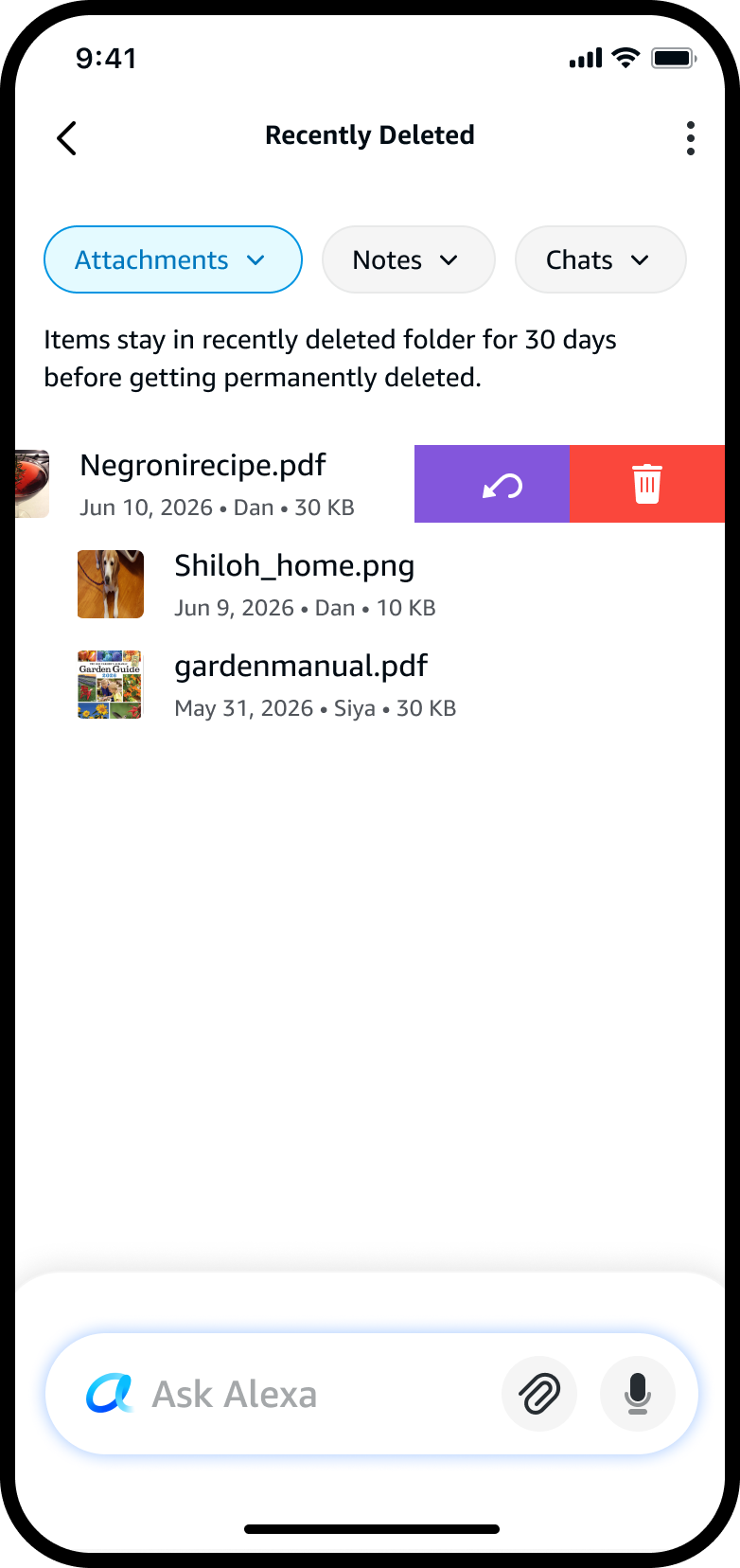
Recently deleted recovery
Recently Deleted folder with Attachments / Notes / Chats filters; items stay for 30 days before permanent deletion; a file row swiped open to reveal restore and delete-permanently actions.

A temporary holding space: removed items wait 30 days, recoverable with a swipe — speed balanced with safety.

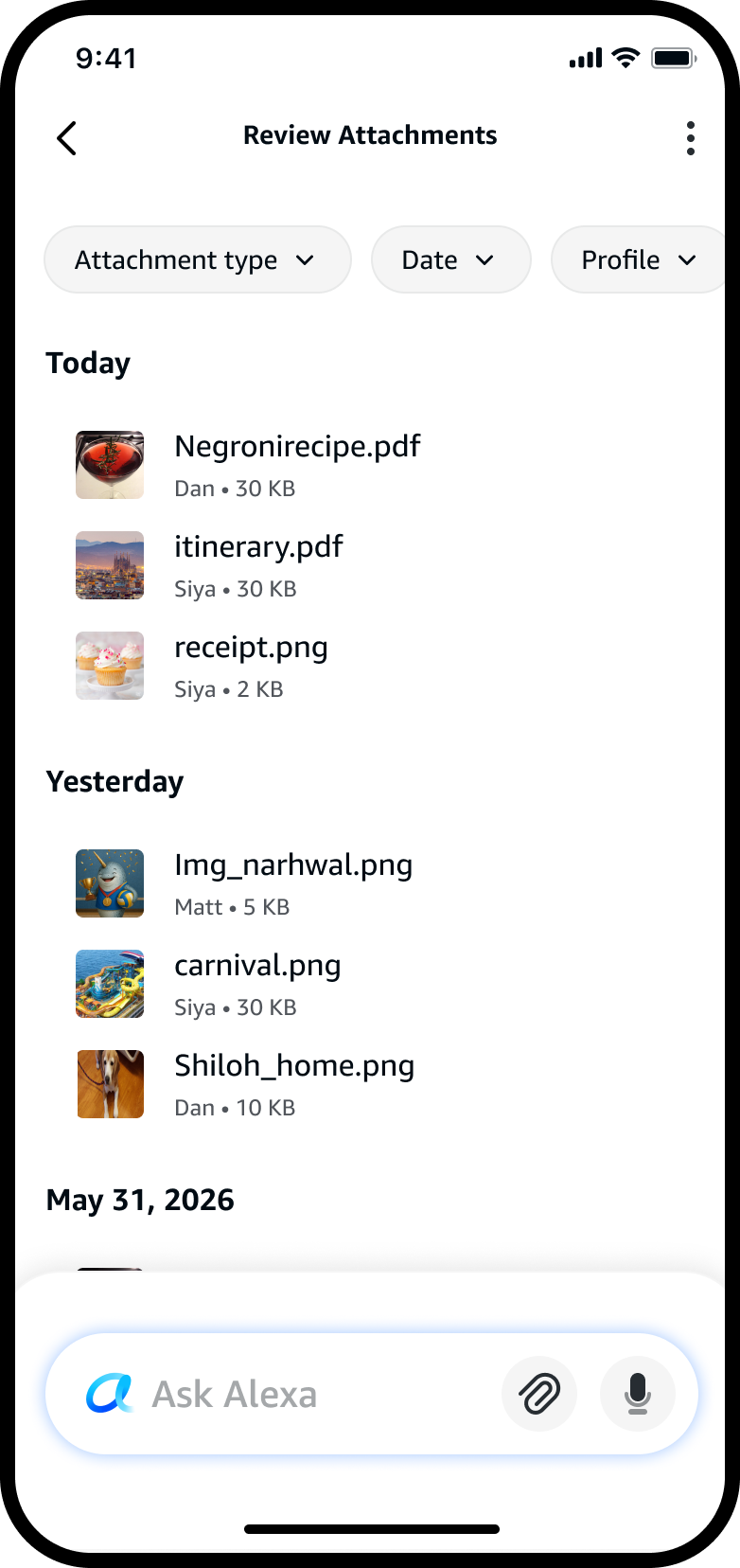
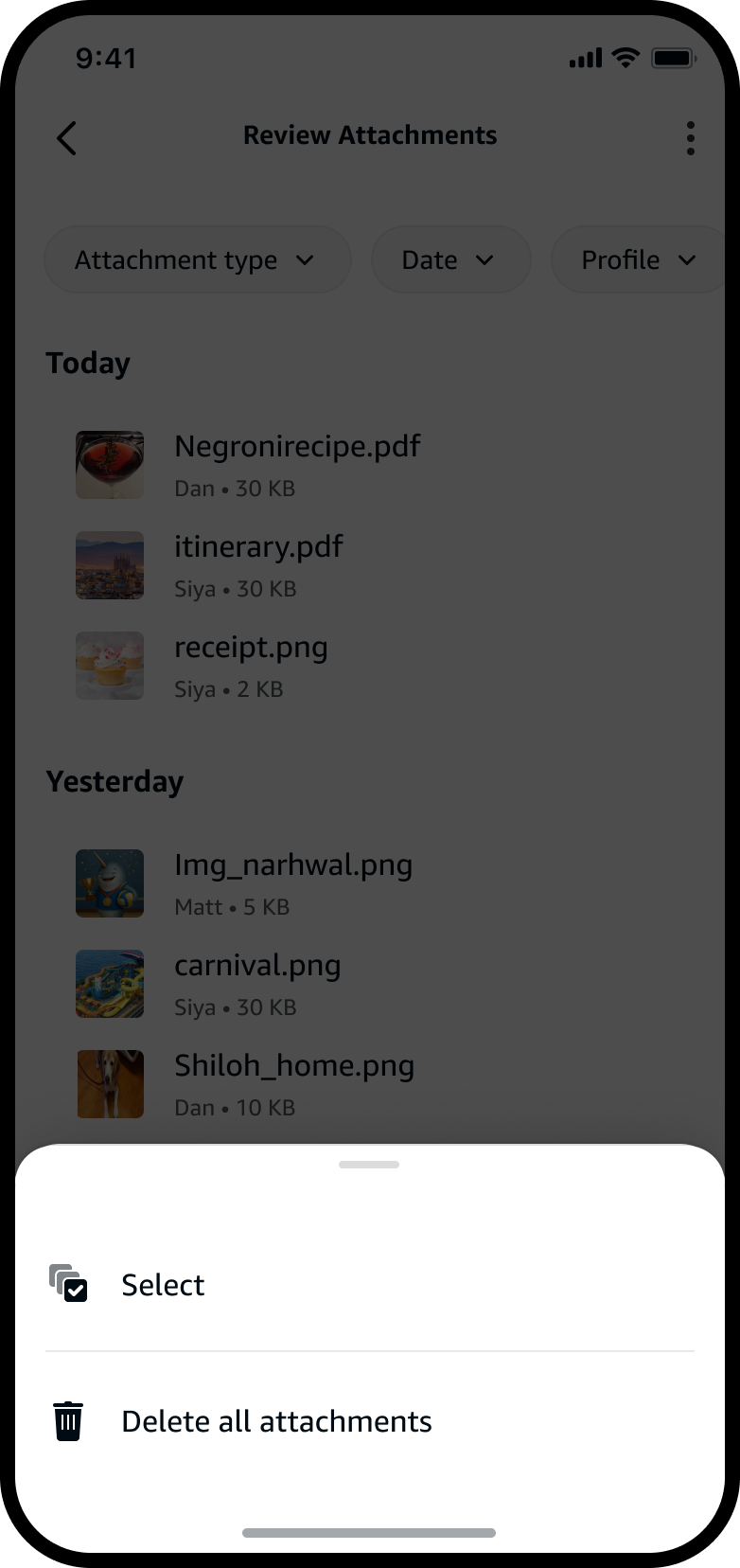
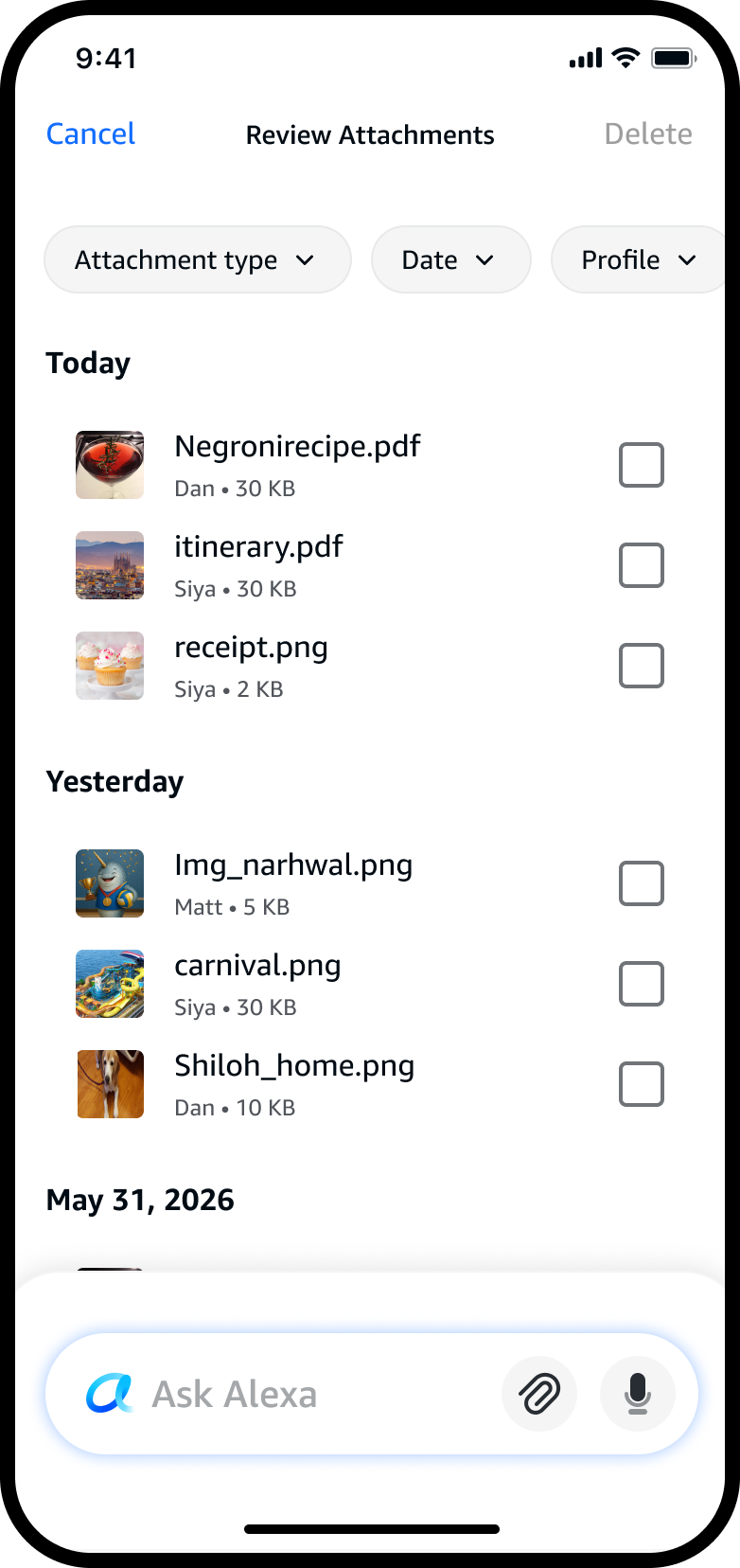
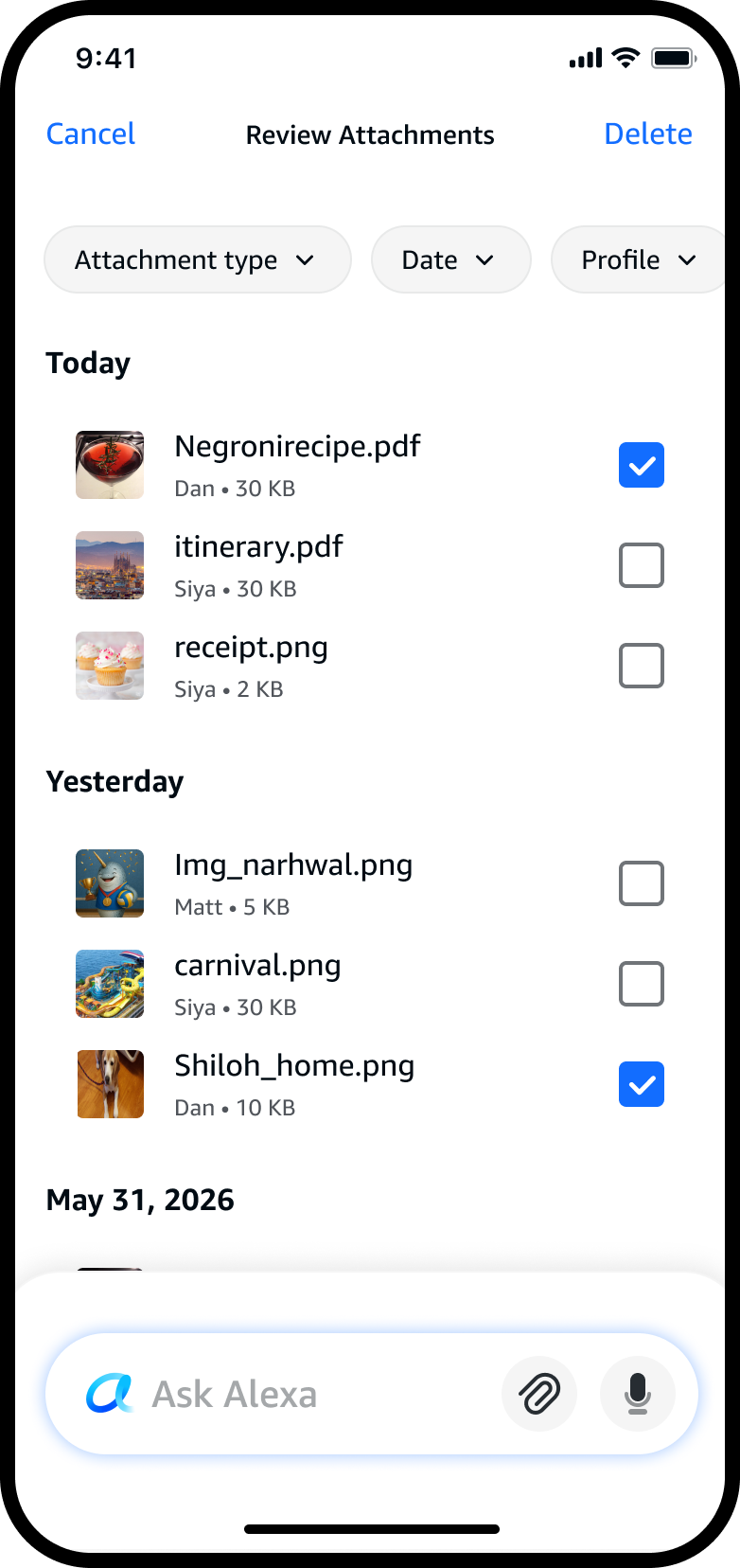
Bulk actions · select & delete flow
Review Attachments list grouped by Today, Yesterday and date, with filter chips.
01
Open the attachment list.
Overflow menu sheet with Select and Delete all attachments options.
02
Tap the menu — Select, or delete all.
Selection mode with empty checkboxes on each file row; Cancel and a dimmed Delete in the header.
03
Selection mode — pick files to remove.
Two files checked; Delete now active in the header.
04
Check several at once; Delete activates.
Confirm deletion sheet asking to delete the selected attachments, with Cancel and Yes, Delete.
05
One confirmation before anything is removed.
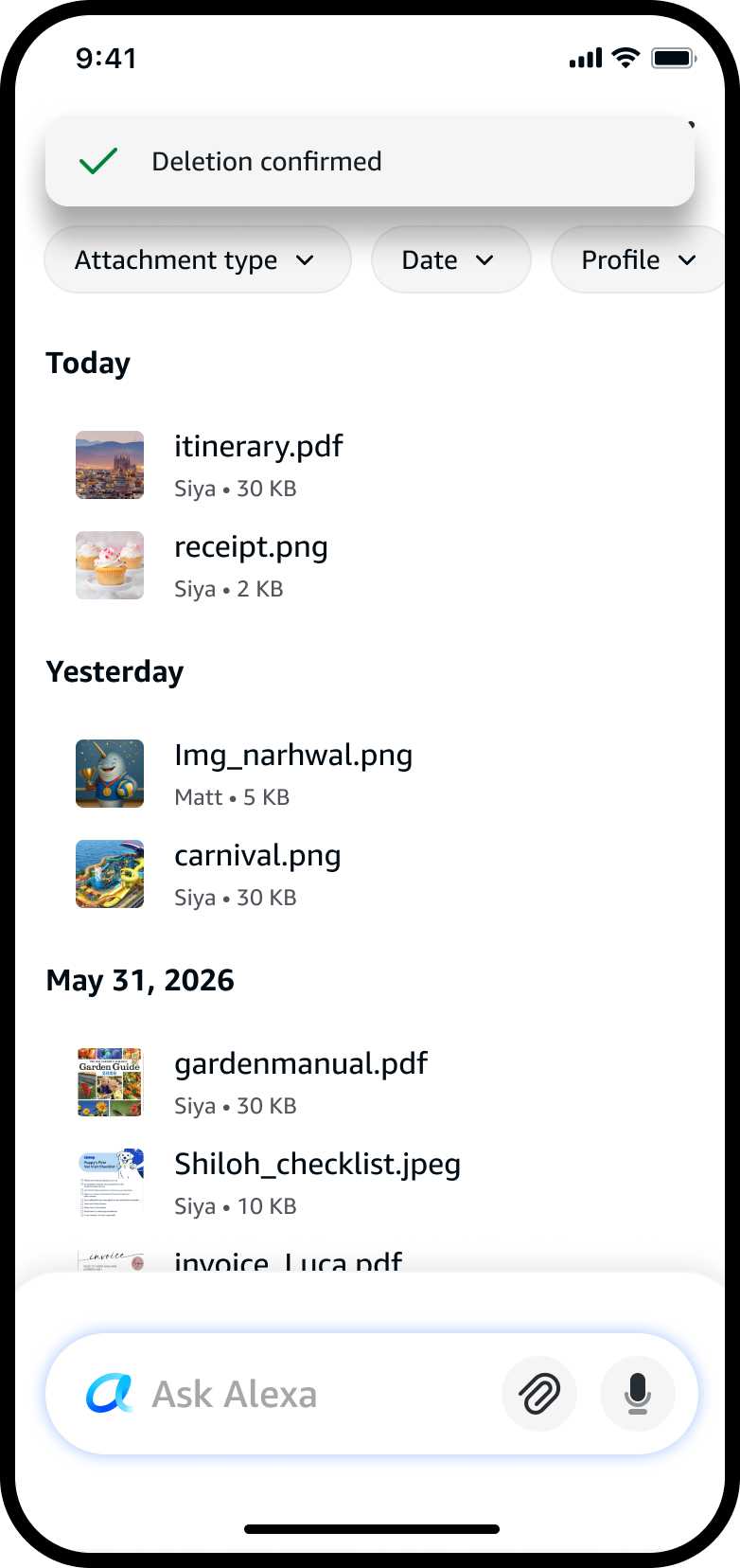
Deletion confirmed banner; the removed files are gone from the list.
06
Clear feedback — the files are gone.

Multi-select scales the same deliberate model to many files at once — single confirmation and clear feedback.

Voice-driven deletion · on Echo
Echo Show screen: ‘Delete all my passport related documents that I shared with you yesterday.’ Alexa found 2 relevant documents — a passport image and a scanned form — shown as thumbnails, asking whether to delete both, with Yes / Delete passport image / Delete scanned form options.

The same controls follow the conversation onto Echo devices — natural voice, on-screen confirmation, nothing removed until the customer says so.

Part of a bigger shift

One of several initiatives moving Alexa into the age of AI.

Alexa risked being left behind — still mostly “set a timer, what's the weather.” Alexa+ was the ground-up reinvention that moved it into the LLM era.

The big lift was the leap from single-turn commands to real conversations that hold context — sharing a document, asking Alexa to build an itinerary from it, saving it, then asking questions about it later. One request became a stateless command; a chain became a conversation that remembered what was shared and why. Review & Manage Attachments was one of several initiatives I led and contributed to inside that shift.

A few others I contributed to
Conversation history
First designer from privacy to take it on — redesigning how multi-turn conversations appear in history, across Echo and mobile.
Privacy dashboard
Reworked a fragmented dump of settings into a clearer, more interactive place to understand and act on your data.
Personalization · “what do you know about me?”
A feature for how Alexa surfaces what it remembers about you — making personalization something you can see, not just something that happens.
What I'd carry forward

Designing trust into AI systems.

Privacy controls for AI aren't about adding more settings. They're about helping customers feel oriented, informed, and in control at the exact moment they need reassurance.

For me, the strongest patterns were the simplest ones — clear entry points, plain-language explanations, and actions that felt deliberate without becoming heavy.

Next project — 01
Add to delivery
Back to top